Ti Adatom on a 5×5 TiN Island
1. Introduction
This tutorial creates the cells of the Ti adatom descent study in the following manuscript: a 5×5-atom TiN island on TiN(001), with a Ti adatom at three of its sites.
Manuscript
D. G. Sangiovanni, A. B. Mei, D. Edström, L. Hultman, V. Chirita, I. Petrov, and J. E. Greene, "Effects of surface vibrations on interlayer mass transport: Ab initio molecular dynamics investigation of Ti adatom descent pathways and rates from TiN/TiN(001) islands", Physical Review B, 2018. DOI: 10.1103/PhysRevB.97.035406. 1
The figure below shows the 5×5-atom island cell in plan view, from the manuscript (Figure 1b):
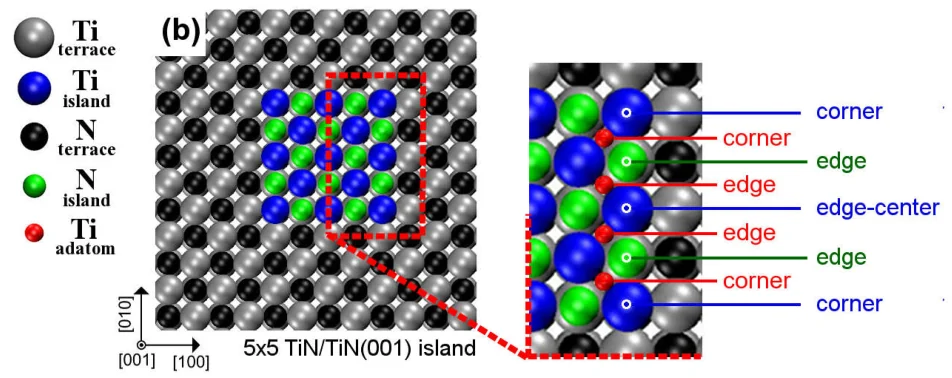
The default cell is that of Sec. II.A of the manuscript: a TiN(001) slab of 12×12 sites and three planes with 15.3 Å of vacuum, under a 5×5-atom island one plane high with Ti corners, 457 atoms in all. The Ti adatom is added at the sites a, c and i of Fig. 6 of the manuscript, which gives three 458-atom cells. CELL_SIZE also offers a smaller cell, 10×10 sites and two planes, of 225 and 226 atoms. The Ti Adatom Descent on a 5×5 TiN Island (MACE and DFT) tutorial relaxes them.
2. Open the notebook
2.1. Load the base material
The notebook loads TiN from Standata by the name in MATERIAL_NAME, so no input material needs to be selected.
2.2. Launch JupyterLite session
Select the "Advanced > JupyterLite Transformation" menu item to launch the JupyterLite environment, or use the notebook embedded in Section 6.
2.3. Open defect_point_adatom_island_titanium_nitride.ipynb notebook
Find and open defect_point_adatom_island_titanium_nitride.ipynb in the specific_examples folder.
3. Configure and create the structure
3.1. Set parameters
Cell 1.1 of the notebook sets the cell size, the slab, the island, the adatom, and the names of the saved materials:
1 2 3 4 5 6 7 8 9 10 11 12 13 14 15 16 17 18 19 20 21 22 23 24 25 26 27 28 29 30 31 | |
CELL_SIZE picks one of the two entries of CELL_SIZES, which carry the xy supercell, the island box and the number of bottom planes removed. "12x12x3" is the manuscript's cell, 12×12 sites over three slab planes; "10x10x2" is a smaller one, 10×10 sites over two, which the simulation tutorial uses for its Density Functional Theory (DFT) jobs. The island is 5×5 atoms with Ti corners in both: the box spans 0.4 crystal units along a and b in the 6×6 supercell and 0.46 in the 5×5, which encloses five sites in each direction either way.
ADATOM_MATERIAL_NAMES carry CELL_SIZE, and the simulation notebook loads them under the same setting.
3.2. Run the notebook
Execute the notebook by selecting "Run" > "Run All Cells" from the JupyterLite menu.
4. Analyze the structure
4.1. Island cell
Section 2 of the notebook builds the slab with the island, removes as many bottom planes as CELL_SIZE asks for, resets the vacuum, and prints, for the default cell:
1 2 | |
The four planes are the three slab planes and the island.
4.2. Adatom sites
Section 3 of the notebook places the Ti adatom at each entry of ADATOM_SITES, measured from the edge N atom with the smaller x: a, the fourfold hollow between that N and the edge-centre Ti, the manuscript's FFH_edge; c, atop that edge N; i, atop the terrace N in front of it. The first lines of its cell turn the offsets into coordinates on the island built in Section 2:
1 2 3 4 5 6 7 8 9 10 | |
Each site is added with create_defect_point_interstitial at that exact cartesian coordinate, and the notebook prints the adatom's three shortest distances:
1 2 3 | |
5. Save the structure
Section 5 of the notebook passes the four materials named in cell 1.1 to Materials Designer, where they can be saved on the platform, and writes them to the uploads folder, from which the simulation tutorial loads them.
6. Interactive JupyterLite notebook
The following JupyterLite notebook creates the island cell and the three adatom cells. Select "Run" > "Run All Cells".
7. Parameter fine-tuning
The cell is changed with CELL_SIZE in cell 1.1, and a cell of another size is a new entry in CELL_SIZES. A start point is changed by editing its entry in ADATOM_SITES in cell 1.1, a triple (Δx, Δy, Δz) relative to the island's edge N atom in units of the site spacing. A new site, such as the fourfold hollow at the island corner of Fig. 1(b), is a new entry in ADATOM_SITES with the matching name in ADATOM_MATERIAL_NAMES. The island size follows the box in ISLAND_MIN_COORDINATE and ISLAND_MAX_COORDINATE, and the terrace size follows XY_SUPERCELL_MATRIX.
8. References
-
D. G. Sangiovanni, A. B. Mei, D. Edström, L. Hultman, V. Chirita, I. Petrov, and J. E. Greene. Effects of surface vibrations on interlayer mass transport: ab initio molecular dynamics investigation of ti adatom descent pathways and rates from tin/tin(001) islands. Physical Review B, 97:035406, 2018. URL: https://link.aps.org/doi/10.1103/PhysRevB.97.035406. ↩